|
|
October 14, 2010
Volume 6, Issue 17
"How-to" tips and advice on increasing
business prosperity, published every other
Thursday.
To change subscription options, please
see the end of this message.
Sign
me up for this newsletter! |
|
Greetings!
- Feature Article: Five Low-Cost Ways to Capture Video Content
- Note from the Author: It's Time to Focus on the Production Details!
- Special Message: 10 Characteristics of Wildly Popular and Profitable Videos
Please add "Adele@LearnShareProsper.com"
to your whitelist or address book in your e-mail program,
so that you have no trouble receiving future issues.
You subscribed at LearnShareProsper.com,
and you're welcome to forward this newsletter to your
colleagues; please just keep the entire message intact.
If you wish to discontinue your subscription, please
use the links at the bottom.
|
|
 |
|
It's Time to Focus on the Production Details!
 My last newsletter focused on ideas for creating simple marketing and educational videos to use in promoting your business products or professional services. These videos can help you communicate your offerings in a creative and compelling way. My last newsletter focused on ideas for creating simple marketing and educational videos to use in promoting your business products or professional services. These videos can help you communicate your offerings in a creative and compelling way.
This approach can dramatically boost your expert status in the eyes of your audience members! It enables them to see you as a much more familiar and accessible individual or company figurehead.
So, are you ready to get started? If so, it's time to begin focusing on how to produce low-cost, highly effective, promotional video campaigns!
If you can package your training, information, demonstrations, opinions, or insights into short, one- to five-minute segments, you'll have a whole world of viewers who want a quick serving of information on sites such as YouTube and Vimeo. These sites have become a clearinghouse for movies on just about any topic, including many with highly strategic business purposes.
For these reasons, I hope you enjoy today's features, including "Five Low-Cost Ways to Capture Video Content." Please don't forget to join the conversation by leaving your comments on my blog!
Here's to your business prosperity,

Adele Sommers, author of the "Straight
Talk on Boosting Business Performance" success
program
P.S. If you missed any previous issue, visit
the newsletter index!
|
|
 |
|
10 Characteristics of Wildly Popular and Profitable Videos
 Wondering what people find most appealing in the way of video topics? Certain subjects and angles keep people relentlessly coming back for more. What are the 10 most popular video types? Wondering what people find most appealing in the way of video topics? Certain subjects and angles keep people relentlessly coming back for more. What are the 10 most popular video types?
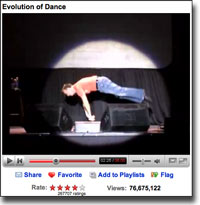
1. Funny - The word "funny" remains one of the most popular search terms used on the Internet. A humorous video -- whether silly, dry and witty, or just plain entertaining -- is an effective way to generate tell-a-friend "buzz." The "Evolution of Dance" video (at right) has been viewed many millions of times, which demonstrates just how wildly engaging a funny video can be!
2. Interesting - Videos that generate fascination and curiosity provide strong incentives for people to learn more after they see your video. You can follow up with additional video installments, and/or direct people to your Web site to see what you offer.
3. Demonstration-based - A plain, no-frills product demonstration can convey more perceived "proof" than any other medium. An excellent example is the wacky but highly lucrative "Will It Blend?" series by Blendtec Home Blenders.
4. Instructional - Instructional videos appear in many varieties, and help build strong credibility and trust with viewers. They can demonstrate processes, explain concepts and ideas, and introduce products and services, often to spark interest in gaining more information or more instruction. Variations within this theme include "infomercials" and "edutainment," which add marketing and entertainment elements to educational information. "How-to" tutorials are another popular variety. For ideas, see Commoncraft's large collection of unique instructional videos.
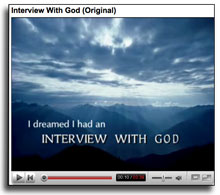 5. Inspiring - The inspirational video genre has spawned a host of spectacularly popular movies. One good example is the "Interview With God," which has gained a huge following since its debut a few years ago. Variations on this theme can include anything designed to motivate and uplift others. These videos often consist primarily of beautiful imagery, moving music, and poetic text floating on the screen. 5. Inspiring - The inspirational video genre has spawned a host of spectacularly popular movies. One good example is the "Interview With God," which has gained a huge following since its debut a few years ago. Variations on this theme can include anything designed to motivate and uplift others. These videos often consist primarily of beautiful imagery, moving music, and poetic text floating on the screen.
6. Personal - We tend to be fascinated with other people's beliefs, feelings, and values. Personal videos run the gamut from poignant to funny to bizarre, and give people insights into the private lives of others.
7. Shocking - Anything genuinely shocking creates a hit on the Internet. For this reason, videos sometimes embed a dramatic introduction (e.g., "The information in this video may shock you!") to grab attention as well as attract online and offline news coverage. For example, see "Shocking Facts You Did Not Know a Minute Ago."
And let's not forget...
8. Weird - Weird theories, weird conspiracies, and general weirdness fascinate viewers. This quality may help your video get noticed -- as long as it's not creepy. For example: See "3D Tattoos Arts and Weird Tattoos."
9. Racy - Adding a risqué or titillating flavor to a promotion is an age-old selling technique.
10. Gross - Grossness still has mass appeal. A fine line exists, however, between being gross and flat-out disgusting. Humorous videos with a small "dose of gross" might be useful, depending on your product. (See the story of the "bionic burger.")
|
|
 |
Five Low-Cost Ways to Capture Video Content
by Adele Sommers
As you ponder how to create inexpensive video productions to engage the full attention of your audiences, you'll want to experiment with the best ways to capture your footage. This article explains five ways to go about it:
1. Web cams
2. Camcorders and pocket video recorders
3. Cellphones and smartphones with video capture features
4. Digital cameras with a video recording function
5. Screen-capture software
 Web Cams Web Cams
Many types of Web cams exist, including the Quickcam by Logitech® (follow the "Compatible Webcams" link on that page to see which cameras work with the software).
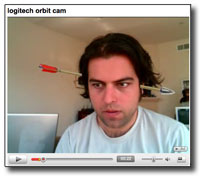 Several models come with or support the use of Logitech's hilarious Video Effects software, which superimposes a wide variety of special effects on your head while you are recording. (See a demonstration.) Several models come with or support the use of Logitech's hilarious Video Effects software, which superimposes a wide variety of special effects on your head while you are recording. (See a demonstration.)
Logitech has designed its latest generation of Web cams specifically with YouTube in mind. Using this type of camera, you can record video directly to YouTube without the need for any intermediary software.
 Camcorders and Pocket Video Recorders Camcorders and Pocket Video Recorders
Digital camcorders offer the most professional option for capturing video and audio. You can find them for about $200 and up. They consist of two types:
- Mini digital video camcorders, which are standard recording devices for most home and semiprofessional video production. Compact and affordable, they offer ease of editing, high resolution, and durability. Recording occurs on small cassettes, most of which can hold over four hours of video.
- "Tapeless" digital video camcorders, which are generally more expensive but provide a more direct means of transferring video to your desktop (usually via a firewire connection between your camcorder and computer).
Other popular options are pocket-sized devices that record high-definition video and audio. One brand is the Flip video recorder, which starts at about $149. It also has companion software that lets you edit and upload videos to your favorite sites.
Cellphones and Smartphones
 Cellphones don't offer great video quality, but do have the advantage of being the most portable and least noticeable devices. If you already have a cellphone that has a video camera, you might want to learn how to use it in case you happen to see something compelling as you go through your daily life. Cellphones don't offer great video quality, but do have the advantage of being the most portable and least noticeable devices. If you already have a cellphone that has a video camera, you might want to learn how to use it in case you happen to see something compelling as you go through your daily life.
Many people upload video from their cellphones or smarphones to a YouTube account via e-mail (explained on YouTube's site).
Digital Cameras
You can use digital cameras with a video capture option to create great YouTube videos. Examine the box or online specifications to see whether a particular camera has a video capture function. Generally, the newer the camera, the more likely it has a digital video feature.
 Note that many digital cameras that capture video do not record audio, so you may want to plan on adding voiceovers or music using video editing software. Note that many digital cameras that capture video do not record audio, so you may want to plan on adding voiceovers or music using video editing software.
Even if you do not have a video capture feature, you can make inspiring video presentations using only still pictures with subtitles and voiceovers or background music, as explained next.
Screen-Capture Software
You can use the motion-recording capabilities of screen-capture software to record anything visible or moving on your computer screen, such as your interactions with a software system or Web site. The best screen-capture packages also let you record live voice narration and add voiceovers, music, and many other effects. Typical uses include:
- Recording slide presentations. Popular ways to create low-cost videos include sequencing still images to create a slideshow, or recording Microsoft® PowerPoint® or other types of slideshows while they are playing. You can then add sound, narration, transitions, and animations to the resulting videos.
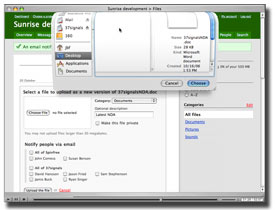 Demonstrating software or other digital products. Screen capture tools have long helped people create tutorials on how to navigate Web sites, software programs, or other products. For example, see a Basecamp guided tour by 37signals. Demonstrating software or other digital products. Screen capture tools have long helped people create tutorials on how to navigate Web sites, software programs, or other products. For example, see a Basecamp guided tour by 37signals.
- Capturing anything that plays on your screen. For instance, you could re-record a video by playing it and recording it at the same time. Unless you have a great deal of memory and lots of processing power, however, be prepared for limitations.
Which screen-capture software should you use? Most software packages have *free* trial versions, which you can test to determine their suitability for your needs.
- One excellent screen-capture software package is Camtasia Studio® by TechSmith®. It's a full-motion capture and editing environment with multiple output formats, including Flash (both .swf and .flv files), AVI, and QuickTime. Newer features include instructional design tools, such as surveys and quiz generators, plus a host of new polishing and publishing features. Many people use Camtasia to edit video they have captured via other devices, such as camcorders and Web cams. You can also add transitions, sound, and other effects. At $299, it's a powerful tool for the price.
- In the instructional design arena, Adobe® Captivate® is a favorite of many software tutorial developers. Version 5 offers full-motion video screen-capture in addition to features that include quiz generating, simulations, captioning, and branching. It also provides sophisticated editing capabilities and several output formats. Currently priced at $799, however, it's a more expensive option.
- A variety of low-cost, low-end screen-capture software programs exist, such as HyperCam™ from Hyperionics®. The older version 2 of HyperCam is currently available at no cost. Although limited to Windows AVI as an output format, it offers a variety of recording and editing features.
Other Video-Editing Programs
Video-editing software in general enables you to add effects such as titles, credits, transitions, and soundtracks to turn your video project into an exciting multimedia experience. When using video-editing software, keep in mind that you want to brand the video with your company name and site URL if using the video to promote your offerings.
 To use these programs to edit your video, you'll first need to transfer the video from your capture device to your desktop, either through a USB or firewire connection and the software that came with your device. To use these programs to edit your video, you'll first need to transfer the video from your capture device to your desktop, either through a USB or firewire connection and the software that came with your device.
Most new computers come with some basic video-editing software installed, or you can download it for *free* or for a nominal fee.
Two such programs are Microsoft® Windows Movie Maker and Apple® iMovie for the Mac. Other editing programs span a range of prices, such as Pinnacle® Studio 9, Sony® Vegas products, Apple® Final Cut products, and Adobe Premier® Pro.
In conclusion, Web cams, camcorders, pocket video recorders, digital cameras, cellphones, and screen-capture software all provide viable ways of recording video. You may find that you already have a capable device, or you might need to buy one. Without spending a fortune on hardware, and by experimenting with trial versions of the editing software, you can determine the combination of options that work best for you.
Copyright 2010 Adele Sommers
|
|
 |
|
Some "Mental Floss" to Tickle Your Brain...
Business mentors Jay Abraham and Spike Humer offer an excellent reminder to keep in mind as we pursue our business and marketing endeavors:
"Focus on the maximum outcome instead of the maximum income."
|
|
 |
|
Adele Sommers, Ph.D. is the author of "Straight
Talk on Boosting Business Performance" -- an award-winning
Special Report and Workbook program.
If you liked today's issue, you'll love this down-to-earth
overview of how 12 potent business-boosting strategies
can reenergize the morale and productivity of your enterprise,
tame unruly projects, and attract loyal, satisfied customers.
It's accompanied by a step-by-step workbook designed
to help you easily create your own success action plan.
Browse the table of contents and reader reviews on the
description page.
Adele also offers no-cost articles and resources to
help small businesses and large organizations accelerate
productivity and increase profitability. Learn more
at LearnShareProsper.com.
LearnShareProsper.com/Business Performance_Inc.,
7343 El Camino Real, Suite 125, Atascadero, CA 93422,
USA. For information and Customer Service, call +1-805-462-2187,
or e-mail Info@LearnShareProsper.com. |
|
| |
|
|
| |
|
©2010
Business Performance_Inc., Adele Sommers, All rights
reserved. www.LearnShareProsper.com
Your feedback is always appreciated!
Write to us at info@LearnShareProsper.com.
We respect your privacy and do not give out or sell
subscriber names or e-mail addresses.
Please use the links below to take
yourself off our list or change your e-mail address.
|
|
|