Focusing on News You Can Use
by Adele Sommers
Today's special edition on useful tips and information covers two topics:
- Google Docs & Spreadsheets
- What Usability Research Tells Us About Trust
 Topic #1: What Is Google Docs & Spreadsheets? Topic #1: What Is Google Docs & Spreadsheets?
With this new, no-cost, Web-based tool from Google (still in beta mode), you can create and edit both documents and spreadsheets, make them available for viewing or editing by others, and send e-mail alerts to collaborators when it's time for them to act.
To use Google Docs and Spreadsheets, you simply set up a Google account and ensure that cookies and JavaScript are enabled on your computer. You can then begin creating documents in the Google Web-based editing environment, or upload your own documents where they will be automatically converted for online editing.
What can you with it? With documents, you can perform all of the basics, such as making bulleted or numbered lists; adding tables, images, comments, links, page breaks, bookmarks, and formulas; setting or changing certain styles, fonts, colors, spacing, and more. You can also check spelling, track revisions by the person who made them, compare document versions, and roll back to any earlier version, if you desire. You can save a document in multiple formats -- PDF, HTML, Word, RTF, and OpenOffice -- by using the "File > Save As" menu option.
 When you have finished a draft, you can invite others to view or collaborate on your document in real time. This feature can help groups overcome the challenges that often result when attempting to circulate and edit documents using e-mail. When you have finished a draft, you can invite others to view or collaborate on your document in real time. This feature can help groups overcome the challenges that often result when attempting to circulate and edit documents using e-mail.
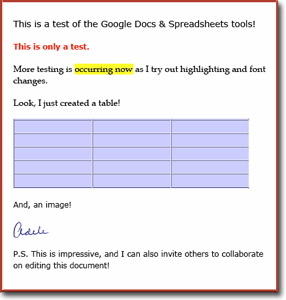
At right is a snapshot of a quick experiment that shows how I used fonts, highlighting, and text colors, and then inserted an empty table and an image.
My husband and I next tested the ability to edit this same document from two separate accounts.
Our collaboration was very much like having a written conversation. Each change made by one person was visible to the other person immediately after saving -- about as quickly as we could chat if we were using instant text messaging, but with a far more substantial result.
In its beta state, this application is probably most useful for collaborative projects rather than as a precise formatting and page layout tool. In future releases, though, we can undoubtedly expect Google Docs & Spreadsheets to expand and improve.
Topic #2: What Does Usability Research Tell Us about Trust?
How do you design a Web site to convey a message of trust? That is, if you aim to woo your audiences by getting them to linger awhile, sample your offerings, buy your products and services, and come back for more, what should you do?
Usability scientists have been trying to answer these questions through carefully designed studies of human-computer interaction. Simply put, they're observing and measuring how people behave on Web sites. Human Factors International recently reported the results of several studies, which I've summarized below.
 First, we should define "trust." Let's simply refer to it as a belief that in a situation with some amount of uncertainty (such as when we visit a new Web site), something on the site will help us figure out how to achieve our goals, will keep its promises to us, and won't try to take advantage of our vulnerabilities. First, we should define "trust." Let's simply refer to it as a belief that in a situation with some amount of uncertainty (such as when we visit a new Web site), something on the site will help us figure out how to achieve our goals, will keep its promises to us, and won't try to take advantage of our vulnerabilities.
The researchers found that in different parts of the world, various cultures exhibit different levels of trust for certain Web design features. These differences pose a challenge for designing sites that appear trustworthy to all cultures.
So, what makes a site appear trustworthy? Here are findings for e-commerce sites designed for heavy shopping, which are also useful guidelines for other sites:
1) A site should be professional looking. This refers to the look of the site, the images of the products, and use of visual design elements. One study found that cool colors; a clear, balanced layout; and judicious use of empty space all contributed to trustworthiness.
2) A site must be easy to use. It should enable visitors to navigate, search, carry out transactions, and access live customer representatives with ease. Response time also should be fast.
3) Content must be informative. Especially for sites involving online health care, features that conveyed trust included relevant illustrations; a wide variety of topics; unbiased information; age-specific information; clear, simple language; discussion groups; assessment tools; and frequently asked questions.
4) The site should list a physical address, and show photos of the company.
 In contrast, what makes a site appear untrustworthy? Findings included: In contrast, what makes a site appear untrustworthy? Findings included:
1) Poor design, which could entail an inappropriate name for the site; a complex, busy layout; a lack of navigational aids; unimaginative color choices; pop-up advertisements; small print and too much text; and poor search facilities or indexes.
2) Poor content, such as irrelevant or inappropriate information.
In summary, the factors that cause a site to appear trustworthy include a variety of things that, taken together, would seem difficult to falsify. When a site looks nice, is well organized, and gives the impression of a significant investment of time, energy, and resources behind it, visitors are more likely to trust it enough to do business with it.
Copyright 2006 Adele Sommers
|





 What an exciting year this has been! Have you ever noticed, however, that when it comes to something like the weather, it's almost impossible to spread it around evenly? There's certainly always plenty of it, but few regions seem to have the perfect amount of whatever they want -- rain, sun, snow, and so on.


 Thus, the library offers a dazzling array of private databases and e-books that an online user can easily tap with powerful search engines. These databases would normally cost thousands of dollars to access privately. However, with a

 More Tips -- A
Special Thank-You to My Subscribers!
More Tips -- A
Special Thank-You to My Subscribers!